
Jij leidt de reanimatie. ReaniMate telt mee.
You lead the resuscitation. ReaniMate keeps count.
ReaniMate is de maat naast je die de klok in het oog houdt en alles mee opschrijft. Ook om drie uur ’s nachts, als een MUG-oproep of rea-alarm je net uit je bed heeft gehaald.
ReaniMate is the mate beside you who keeps an eye on the clock and writes everything down. Even at three in the morning, when a resus call has just dragged you out of bed.
Het idee
The idea
Wat je tijdens een reanimatie niet meer moet onthouden.
What you no longer have to keep in your head during a resuscitation.
Tik gewoon op wat er gebeurt. ReaniMate houdt de tijd bij en zet alles met het uur erbij in het logboek.
Just tap what happens. ReaniMate keeps the time and puts everything in the log with the time next to it.
"Wanneer was die laatste adrenaline?"
"When was that last adrenaline?"
De adrenalineklok loopt mee. Bij de ritmecheck zegt ReaniMate of de volgende dosis mag.The adrenaline clock runs along. At the rhythm check ReaniMate tells you whether the next dose is due."Was dat nu al de derde shock?"
"Was that the third shock?"
ReaniMate telt mee, ook gestapelde shocks. Na de derde shock staan adrenaline en amiodarone klaar om te registreren.Shocks are counted correctly, stacked ones too. After the third shock, adrenaline and amiodarone are ready to record."Hoe lang zijn we hier al bezig?"
"How long has this been going?"
CPR-duur, low-flow en no-flow staan altijd klaar. Handig als je eCPR moet aanmelden.CPR duration, low-flow and no-flow are ready, also for the eCPR referral."Wat hebben ze al gedaan voor wij er waren?"
"What happened before we arrived?"
Kom je later toe, bijvoorbeeld met de MUG? Tik op ‘Reanimatie al bezig’ en vul in hoe lang ze al bezig zijn (in minuten, in cycli of met het uur waarop CPR startte) en hoeveel shocks en adrenaline er al gegeven zijn. ReaniMate rekent gewoon verder, ook voor de samenvatting.Arriving later, for example with the physician-staffed ambulance? Tap ‘Resuscitation already under way’ and enter how long CPR has been going (in minutes, in cycles or with the time CPR started) and how many shocks and how much adrenaline were already given. ReaniMate simply carries on from there, summary included.Functies
Features
Wat ReaniMate tijdens een ALS voor je doet.
What the app does for you during ALS.
Ritmecyclus
Rhythm cycle
De 2-minutencyclus telt af. 15 seconden vooraf zegt ReaniMate wat je klaarzet (laden tijdens de compressies, wissel van compressor, adrenaline), bij de ritmecheck volgt een seintje met geluid en trillen. Er is ook een metronoom voor 100 tot 120 compressies per minuut.
The 2-minute cycle counts down. 15 seconds before, ReaniMate tells you what to prepare (charging during compressions, compressor swap, adrenaline), and at the rhythm check you get a signal with sound and vibration. There is also a metronome for 100 to 120 compressions per minute.
Medicatie op tijd
Drugs on time
Shock, adrenaline en amiodarone registreer je met één tik. De app volgt de timing van ERC 2025, bundelt adrenaline rond de ritmecheck en telt gestapelde shocks bij een gemonitord arrest correct mee.
Record shock, adrenaline and amiodarone with one tap. The app follows ERC 2025 timing, bundles adrenaline around the rhythm check and counts stacked shocks in a monitored arrest correctly.
Refractair VF en eCPR
Refractory VF and eCPR
Korte stappen met de kernwoorden in het vet: vector change, padposities, 4H/4T en op tijd eCPR. De aanmelding eCPR zet alles wat het centrum vraagt op één scherm.
Short steps with the key words in bold: vector change, pad positions, 4H/4T and eCPR in time. The eCPR referral puts everything the centre asks for on one screen.
Na ROSC
After ROSC
De klok toont de tijd sinds ROSC, met de post-reanimatiezorg volgens ABCDE, het ECG vanaf 8 minuten en de eerste parameters. Opnieuw een arrest met VF? Dan staan de gestapelde shocks meteen klaar.
The clock shows the time since ROSC, with post-resuscitation care by ABCDE, the ECG from 8 minutes and the first vital signs. Re-arrest in VF? The stacked shocks are ready straight away.
Logboek en overdracht
Log and handover
Elke tik komt met het uur in het logboek en achteraf kan je nog bijsturen. Onder ‘Bellen en overdracht’ staan je nummers, de aanmelding, ATMIST, SBAR en de samenvatting voor het dossier.
Every tap is time-stamped and can be edited afterwards. ‘Call and handover’ holds your numbers, the pre-alert, ATMIST, SBAR and the summary for the record.
Naslag
Reference
Het ALS-algoritme van de ERC, 4H/4T, refractair VF, padposities, capnografie, fysiologisch gestuurde CPR, eCPR en bijzondere omstandigheden: anafylaxie, hypothermie, hyperkaliëmie, zwangerschap, longembolie, intoxicatie, trauma en astma.
The ERC ALS algorithm, 4H/4T, refractory VF, pad positions, capnography, physiology-guided CPR, eCPR and special circumstances: anaphylaxis, hypothermia, hyperkalaemia, pregnancy, pulmonary embolism, poisoning, trauma and asthma.
Twee ontwerpen
Two designs
Klassiek of Strak? Je kiest bij de start.
Classic or Clean? You choose when you first open the app.
Het is dezelfde app met dezelfde meldingen, enkel het ontwerp verschilt. Klassiek is het vertrouwde ontwerp. Strak is nieuw en nog in beta. Wisselen kan altijd via Instellingen.
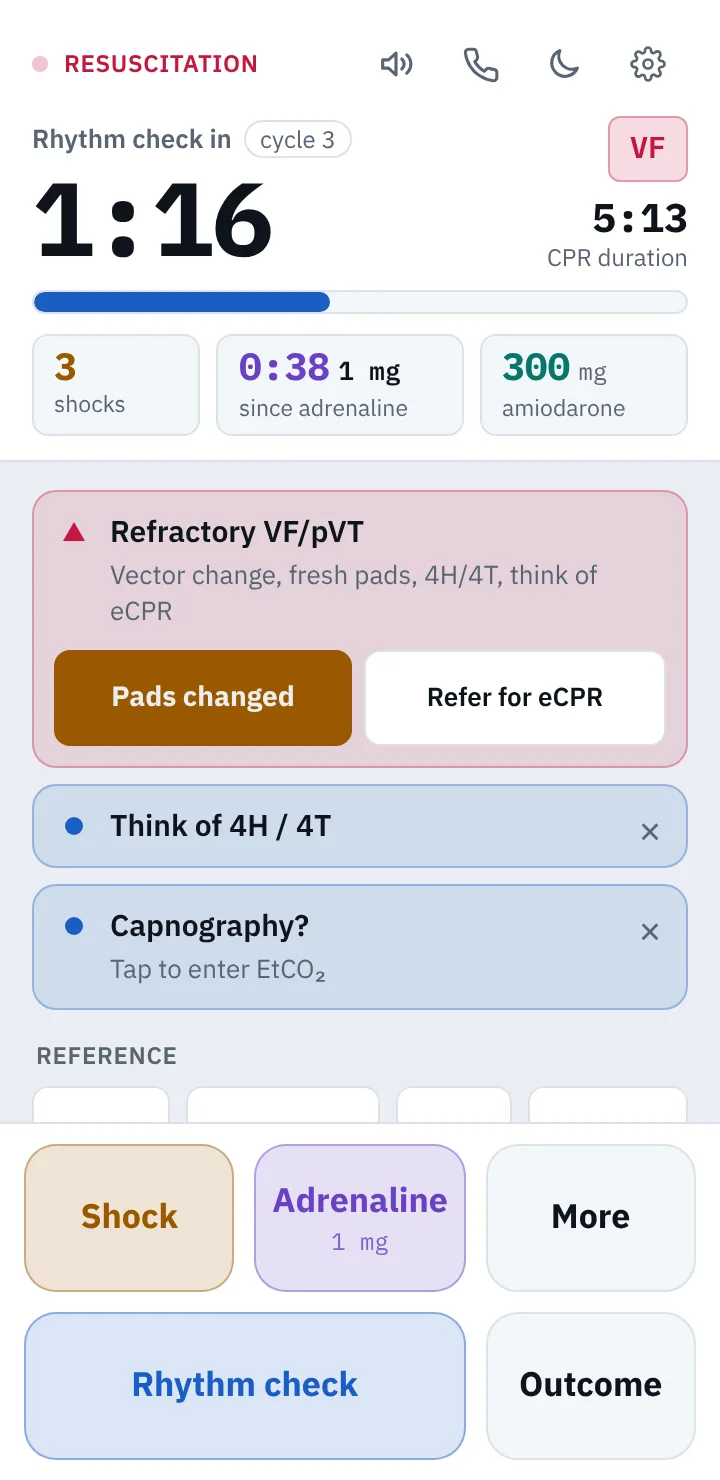
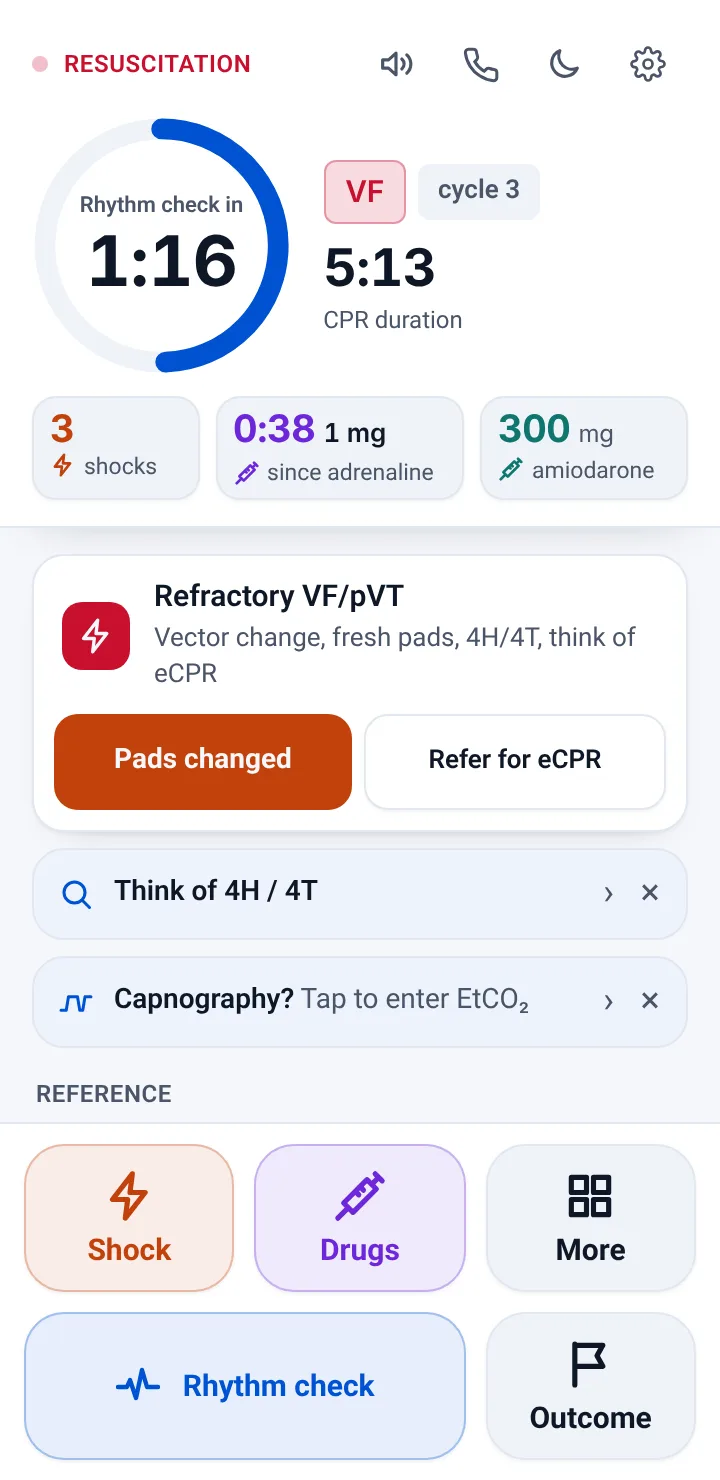
It is the same app with the same prompts; only the design differs. Classic is the familiar design. Clean is new and still in beta. You can switch at any time in Settings.
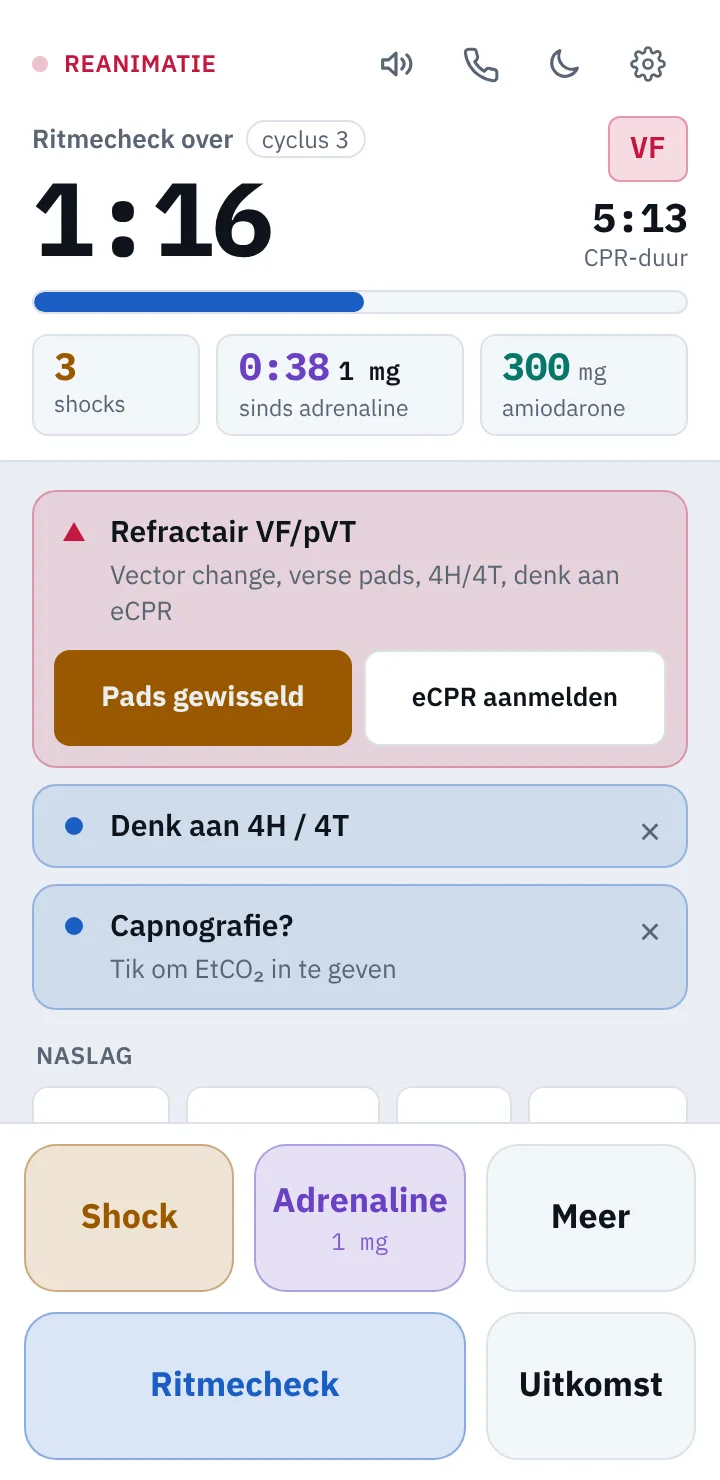
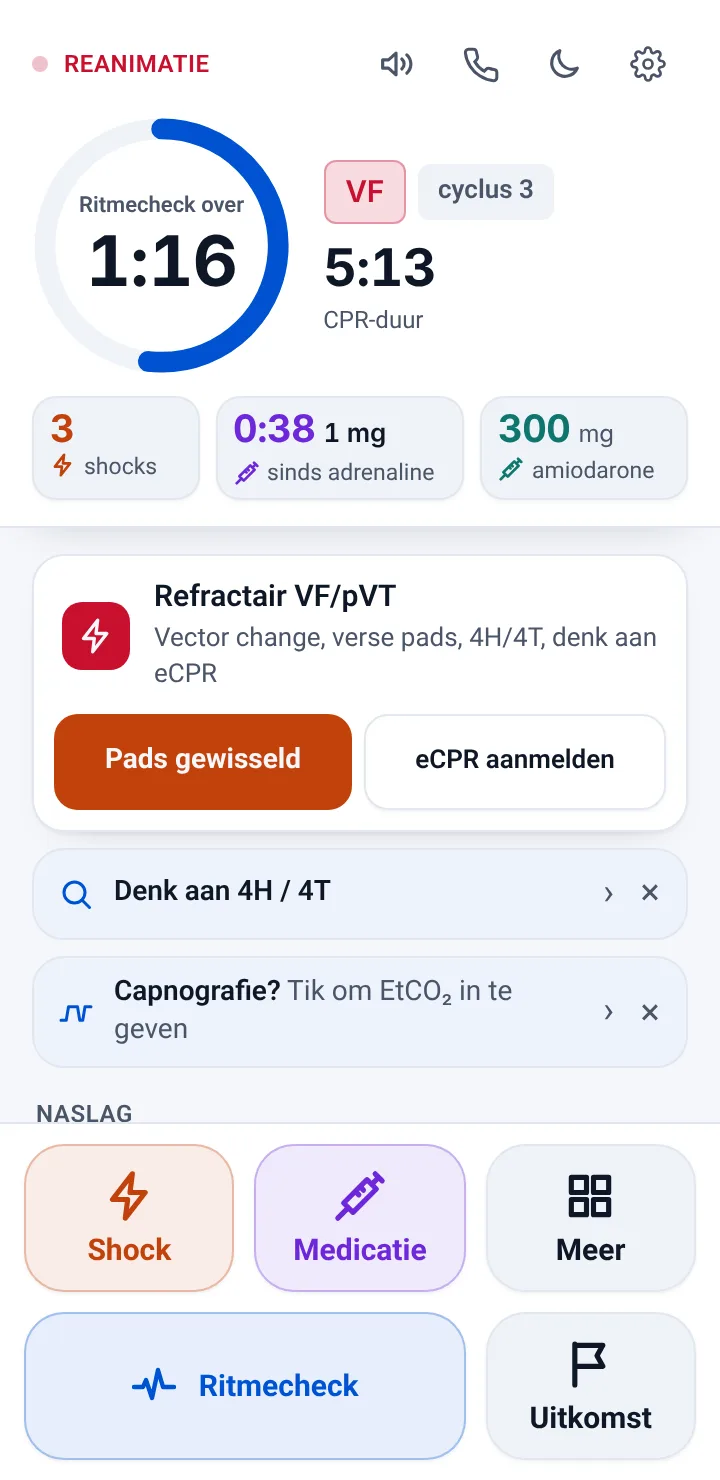
Beide schermen tonen hetzelfde moment: VF in cyclus 3, na drie shocks, adrenaline en amiodarone.
Both screens show the same moment: VF in cycle 3, after three shocks, adrenaline and amiodarone.
Gratis en vrij toegankelijk voor iedereen.
Free and open to everyone.
Gemaakt door Guillaume Roox, urgentiearts, in de geest van FOAMed (free open access medical education). Wat je invult, blijft op je eigen toestel. Zie je een fout of mis je iets? Stuur gerust een mailtje.
Made by Guillaume Roox, emergency physician, in the spirit of FOAMed (free open access medical education). What you enter stays on your own device. Found an error or missing something? Feel free to drop me a line.
Op je toestel
On your device
De Android-app komt eraan. Tot dan gebruik je gewoon de webapp.
The Android app is on its way. Until then, use the web app.
Android-appAndroid app
ReaniMate zit in de laatste testronde bij Google Play. Bij de eerste start stel je in een paar stappen in waar je werkt, je regio, je nummers en het ontwerp. De app trilt bij de ritmecheck, houdt het scherm wakker en bewaart afgeronde reanimaties 30 dagen op je toestel.
ReaniMate is in its final test round on Google Play. At first start, a few steps set up where you work, your region, your numbers and the design. The app vibrates at the rhythm check, keeps the screen awake and keeps completed resuscitations on your device for 30 days.
Nu al testen op Android of iPhoneTest it now on Android or iPhone
Webapp op je beginschermWeb app on your home screen
Open app.reanimate.be één keer met netwerk. Daarna werkt de app ook offline.
Open app.reanimate.be once with a network connection. After that the app also works offline.
iPhone (Safari)
- Open app.reanimate.be in Safari.
- Tik op de deelknop (vierkantje met een pijl omhoog). Zie je die niet, tik dan eerst op ••• (drie puntjes) en daarna op ‘Deel’.
- Kies ‘Zet op beginscherm’. Staat het er niet bij, scroll dan naar beneden.
- Tik op ‘Voeg toe’.
Android (Chrome)
- Open app.reanimate.be in Chrome.
- Tik rechtsboven op ⋮ (drie puntjes).
- Kies ‘App installeren’ of ‘Toevoegen aan startscherm’.
- Bevestig met ‘Installeren’ of ‘Toevoegen’.
In de webapp staat op het startscherm ook een knop ‘Installeer als app’ met dezelfde stappen.
iPhone (Safari)
- Open app.reanimate.be in Safari.
- Tap the share button (a square with an arrow pointing up). If you don't see it, tap ••• (three dots) first, then ‘Share’.
- Choose ‘Add to Home Screen’. If it isn't listed, scroll down.
- Tap ‘Add’.
Android (Chrome)
- Open app.reanimate.be in Chrome.
- Tap ⋮ (three dots) at the top right.
- Choose ‘Install app’ or ‘Add to home screen’.
- Confirm with ‘Install’ or ‘Add’.
The start screen of the web app also has an ‘Install as app’ button with the same steps.
Eerst eens proberen?
Try it first?
Neem ReaniMate mee naar je volgende training of oefenreanimatie. Dan ken je de knoppen al als het echt is. Het beste blijft de richtlijnen zelf te kennen: volg een ALS-cursus van de ERC.
Bring ReaniMate to your next training session or mock code. Then you already know the buttons when it is for real. Knowing the guidelines yourself remains best: take an ERC ALS course.